
Infinix Enters a New Software Era with XOS 16
Infinix is clearly signaling that it wants to play a much bigger game in the smartphone software space, and XOS 16 is proof of that ambition. With Android 16 as its foundation, Infinix XOS 16 isn’t just another routine update—it’s a bold reimagining of how Infinix phones will look, feel, and behave in the coming years. The company has leaned heavily into modern design principles, deep personalization, and artificial intelligence, all while keeping everyday usability in focus.
What makes this update especially exciting is that Infinix has confirmed XOS 16 will come pre-installed on its future smartphones, while existing users can expect a staged rollout. That alone tells us how confident the brand is in this version. Instead of minor tweaks, XOS 16 delivers visible changes from the moment you unlock your phone. Animations feel smoother, the interface feels more alive, and AI quietly works in the background to make daily tasks easier.
Think of XOS 16 as Infinix’s attempt to turn software into a genuine selling point rather than just a supporting feature. From students and casual users to gamers and content creators, this update aims to touch everyone’s daily smartphone habits. So, let’s break it all down and explore what XOS 16 really brings to the table, how it improves the user experience, and why it could be a turning point for Infinix smartphones in 2026 and beyond.
What Is Infinix XOS 16? A Complete Overview
Infinix XOS 16 is the brand’s next-generation custom Android interface, built on top of Android 16. But calling it “just a skin” wouldn’t be fair. This update represents a shift in how Infinix approaches software design, performance optimization, and intelligent features. Instead of stuffing the system with flashy but impractical tools, XOS 16 focuses on balance—beauty, brains, and usability working together.
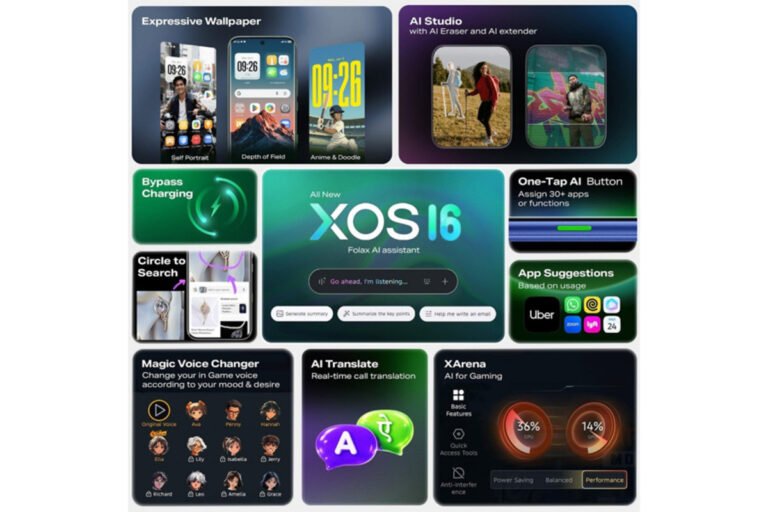
At its core, XOS 16 is designed to feel fluid and personal. The new visual language, known as Glow-space, gives the interface a modern identity that doesn’t feel copied or outdated. Meanwhile, AI plays a central role, helping users write notes, summarize calls, organize information, and even generate themes based on text or images. These aren’t gimmicks; they’re practical tools meant to save time and reduce friction.
What really stands out is how XOS 16 adapts to different types of users. If you’re someone who loves customization, you’ll appreciate the deep personalization options. If you’re a productivity-focused user, the AI-powered notes, call summaries, and assistant tools will feel like a quiet personal secretary. And if you’re a gamer or multimedia lover, performance modes, frame interpolation, and bypass charging make a noticeable difference. In short, XOS 16 isn’t trying to be everything—it’s trying to be smart where it counts.
Glow-Space Design: A Fresh Visual Identity
One of the first things you’ll notice when using XOS 16 is its brand-new Glow-space visual design. This isn’t just a coat of paint; it’s a complete visual refresh that changes how the system feels at every interaction. Infinix has focused on making the interface feel alive yet calm, colorful but not overwhelming.
The design language is paired with what Infinix calls “liquid motion animations.” These animations make transitions between apps, menus, and screens feel natural and fluid, almost like water flowing rather than rigid panels snapping into place. It’s subtle, but once you get used to it, going back to older versions feels jarring. Every swipe, tap, and scroll feels intentional and smooth.
Beyond aesthetics, Glow-space improves usability. Icons are clearer, menus are better spaced, and visual hierarchy is easier to understand. This means less eye strain and fewer accidental taps. Whether you’re checking notifications, switching apps, or adjusting settings, the interface feels thoughtfully designed. It’s the kind of design upgrade that doesn’t scream for attention but quietly improves your daily experience.
Personalization Taken to the Next Level
Personalization is where XOS 16 truly shines, and Infinix has clearly listened to users who want their phones to feel unique. The system offers a wide range of customization options, from redesigned system app icons to fresh wallpapers and fully customizable themes. You’re no longer limited to a few preset looks—you can shape the entire vibe of your phone.
One standout feature is the AI-powered theme generator. This tool allows users to create custom themes using simple text prompts or even images. Want a theme inspired by a sunset, a futuristic city, or a calm forest? Just describe it, and the AI handles the rest. This takes personalization to a level that feels both creative and effortless.
Lock screen and home screen depth effects add another layer of immersion. These effects create a subtle 3D feel, making wallpapers interact with widgets and notifications in a more dynamic way. Combined with smooth animations, your phone starts to feel less like a static screen and more like a living interface. Importantly, all these features come with user control—you can keep things minimal or go all out. XOS 16 adapts to your style, not the other way around.
AI at the Core of XOS 16
Artificial intelligence isn’t just an add-on in XOS 16—it’s woven into the system’s DNA. Infinix understands that AI only matters if it solves real problems, and that philosophy is evident throughout the interface. Instead of flashy demos, XOS 16 focuses on practical AI tools that work quietly in the background.
From organizing notes to summarizing recordings and translating calls, AI in XOS 16 aims to save time and mental effort. Many of these features work on-device, ensuring faster responses and better privacy. Others leverage cloud processing for more complex tasks, striking a balance between performance and accuracy.
What’s refreshing is how optional everything feels. You’re not forced to use AI features, and they don’t constantly interrupt your workflow. They’re there when you need them, like a helpful assistant waiting in the background. This approach makes XOS 16 feel more human, not more robotic.
Folax Assistant: Your Smart Digital Companion
Folax Assistant is Infinix’s answer to the growing demand for smarter digital companions. Think of it as a voice-powered assistant that actually understands your daily routines. You can use Folax to set reminders, manage tasks, control system settings, and get quick answers without digging through menus.
What makes Folax stand out is its contextual awareness. It doesn’t just respond to commands—it learns from your usage patterns. Over time, it becomes better at suggesting actions, whether it’s reminding you about a meeting or helping you organize your day.
For busy users, Folax feels like an invisible helper. You speak naturally, and it responds naturally. There’s no need to memorize specific commands. This makes it accessible even to users who aren’t tech-savvy, which is a big win for everyday usability.
AI Notes, AI Recording Summary, and Flash Memo
Note-taking gets a major upgrade in XOS 16 thanks to AI Notes. Instead of typing everything manually, the system can help structure your notes, highlight key points, and even suggest summaries. It’s perfect for students, professionals, and anyone who jots things down throughout the day.
AI Recording Summary is another practical tool. Record a lecture, meeting, or interview, and XOS 16 will generate a concise summary for you. This means less time re-listening and more time acting on the information.
Flash Memo is all about speed. It captures on-screen content, creates summaries, and adds tags automatically. Whether it’s a webpage, chat, or document, Flash Memo helps you save information without breaking your flow.
AI Call Assistant: Smarter Communication
Communication is a big focus in XOS 16, and the AI Call Assistant proves it. Real-time call translation makes cross-language conversations smoother, especially for business or travel. The feature works quietly in the background, translating without disrupting the call.
Call summaries are another game-changer. After a call ends, XOS 16 can generate a brief summary highlighting key points. This is incredibly useful for work calls, interviews, or important personal conversations.
Auto-answer for important calls ensures you never miss critical communication. The system can recognize priority contacts and handle calls intelligently, adding a layer of convenience without compromising privacy.
Camera Enhancements in XOS 16
XOS 16 brings smart camera upgrades that focus on creativity and simplicity. The native AI eraser allows users to remove unwanted objects from photos with just a tap. No third-party apps, no complicated tools—just clean results.
Image extension lets you expand photos naturally, filling in missing areas using AI. This is perfect for social media posts or creative editing. Combined with improved image processing, photos look more polished and professional.
These features make photography more accessible. You don’t need to be an expert editor to get great results, and that’s exactly the point.
Gaming Performance Upgrades in XOS 16
Gamers will feel right at home with XOS 16. The system includes multiple performance modes—Performance, Balanced, and Power Saving—allowing users to tailor their experience. Whether you want maximum FPS or longer battery life, there’s an option for you.
Frame interpolation ensures smoother visuals, reducing stutter during intense gameplay. Bypass charging is another thoughtful addition, letting you power the device directly without stressing the battery during long sessions.
All these features combine to deliver a gaming experience that feels stable, smooth, and reliable, even during extended play.
Infinix XOS 16 Availability and Rollout Plan
Infinix has confirmed that XOS 16 will ship pre-installed on upcoming smartphones, setting a new standard for the brand’s future devices. Older models won’t be left behind either, as the update will roll out gradually in stages.
This approach ensures stability and allows Infinix to fine-tune the experience across different hardware. Users can expect timely updates, clear communication, and a smoother transition overall.
Conclusion: Is Infinix XOS 16 a Game-Changer?
Infinix XOS 16 feels like a confident step forward. With its modern Glow-space design, deep personalization, and genuinely useful AI features, it transforms the smartphone experience without overwhelming the user. It’s smooth, smart, and surprisingly human in how it adapts to daily needs.
For Infinix, this update isn’t just about keeping up—it’s about standing out. And based on what XOS 16 offers, it’s clear that Infinix is serious about shaping the future of its smartphones.
FAQs
1. What makes Infinix XOS 16 different from earlier versions?
XOS 16 introduces a new visual design, deeper personalization, and practical AI features that significantly improve usability.
2. Which Infinix phones will receive XOS 16?
Future Infinix phones will ship with XOS 16, while older models will receive it through a staged rollout.
3. Does XOS 16 support AI features offline?
Many AI tools work on-device, while some advanced features may require an internet connection.
4. Is XOS 16 good for gaming?
Yes, with performance modes, frame interpolation, and bypass charging, XOS 16 is well-optimized for gaming.
5. How does XOS 16 improve personalization?
It offers custom themes, AI-generated designs, depth effects, and extensive visual customization options.
Please don’t forget to leave a review.